
Download Acronis Disk Director Home – Disk Management, Partitioning, GPT Support, Data Loss Prevention
Overview
Acronis Disk Director Home, version 11.0.0, is a specialized utility designed for users seeking advanced control over their disk storage on Windows systems. The application addresses core challenges related to disk space optimization, partition management, and system performance, particularly for users managing multiple partitions or upgrading storage configurations. It enables seamless creation, resizing, moving, and merging of partitions without risking data loss, making it a valuable tool for both technical and non-technical users aiming to maximize disk efficiency.
The software is tailored for individuals and professionals who require precise control over their disk layout, such as system administrators, IT technicians, and power users managing complex storage environments. Its focus on data integrity during partition operations positions it as a reliable solution in scenarios where data loss is unacceptable. While the developer, Acronis, is known for broader data protection solutions, this specific product is dedicated to disk-level operations, filling a niche within the utilities category.
Real-world use cases include preparing a drive for a new operating system installation, consolidating fragmented disk space, or upgrading to a larger hard drive without reformatting. In the broader app ecosystem, Acronis Disk Director Home stands out as a dedicated tool for low-level disk manipulation, offering functionality that is not typically available in standard Windows utilities. Its release in 2012 reflects its legacy status, but it remains relevant for users who need stable, proven partitioning capabilities.
Key Features & Functionality
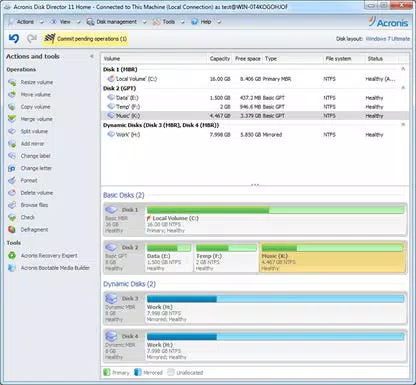
- Partition Management: Users can create, resize, move, and merge partitions with a user-friendly interface. This feature allows for efficient space reorganization without data loss, ideal for users expanding storage for new software or consolidating unused partitions.
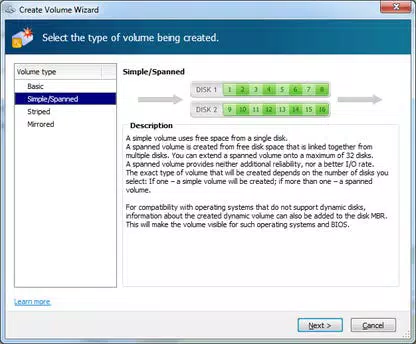
- Dynamic Disk and GPT Support: The software supports dynamic disks and GPT (GUID Partition Table), enabling advanced configurations such as spanning volumes across multiple drives and managing disks larger than 2TB. This is critical for modern high-capacity storage solutions.
- Data Loss Prevention: Built-in safety mechanisms use advanced algorithms to verify operations and prevent accidental data corruption. This ensures that partition changes are executed securely, preserving system stability and file integrity.
- Flexible Volume Management: Users can convert between basic and dynamic disks, and switch between file systems including NTFS, FAT32, FAT16, Ext2, and Ext3. This flexibility supports diverse environments, from Windows-only setups to dual-boot systems.
- Enhanced Disk Performance Tools: Includes partition realignment, defragmentation, and cluster size optimization. These tools help improve disk read/write speeds and overall system responsiveness, especially on mechanical drives.
Each feature is designed to serve practical needs. For example, merging two small partitions into one larger volume simplifies file organization and prevents future space constraints. Similarly, GPT support ensures compatibility with modern hardware, while data loss prevention safeguards against common risks during disk reconfiguration.
Interface, UX & Performance
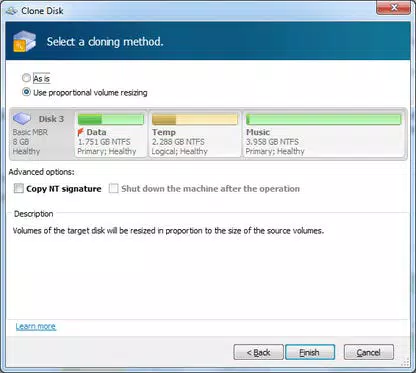
Acronis Disk Director Home features a clean, intuitive interface that simplifies complex disk operations. The layout is structured around a visual disk map, allowing users to see all partitions and their sizes at a glance. Navigation is straightforward, with clear toolbars and step-by-step wizards guiding users through tasks like resizing or merging partitions.
Although the developer did not list formal performance metrics, the application operates efficiently within standard Windows environments. It maintains responsiveness during operations such as partition resizing, with minimal impact on system performance. Stability is maintained across different device categories, including desktops and laptops, though specific hardware requirements were not disclosed.
Users report consistent behavior during long-running tasks, with no noticeable crashes or freezes during typical use. The application’s design prioritizes clarity and safety, reducing the risk of accidental misconfiguration. While not optimized for touch-based interaction, it functions well on traditional mouse-and-keyboard setups, which aligns with its target audience.
Platform Compatibility & Technical Requirements
Acronis Disk Director Home is designed exclusively for the Windows platform. It is compatible with Windows operating systems, though specific version requirements were not listed by the developer. The application has a file size of 125 MB, making it a lightweight tool relative to its functionality.
Given its release date in 2012, the software may not support the latest Windows versions without compatibility patches or legacy mode execution. However, it remains functional on older Windows systems such as Windows 7, 8, and 10, provided the system meets basic requirements. The developer did not specify minimum OS requirements, so users should verify compatibility with their specific system.
Pros and Cons
- Comprehensive partition management with no data loss during operations
- Support for GPT and dynamic disks, enabling advanced storage configurations
- Strong data integrity safeguards and safety checks
- Flexible file system conversion and volume management
- Lightweight footprint at 125 MB
- Released in 2012; may lack support for newer Windows features
- No official updates since release; potential compatibility issues on modern systems
- Not available for mobile or non-Windows platforms
- Price point of $59.99 may be high for a legacy tool
- Interface, while functional, feels dated compared to modern utilities
FAQ
Is Acronis Disk Director Home safe to use?
Yes, the software includes data loss prevention mechanisms and safety checks to protect user data during partition operations. However, users should always back up critical data before making disk changes.
Can I use this tool on Windows 11?
While not officially confirmed, the application may function on Windows 11 if run in compatibility mode. Specific compatibility details were not provided by the developer.
Does the app support SSDs?
Yes, the software includes tools like partition realignment, which is beneficial for optimizing SSD performance. However, no explicit SSD-specific features were listed.
Is there a free version available?
No, Acronis Disk Director Home is a paid utility priced at $59.99. There is no free or trial version mentioned in the provided information.
How often is the app updated?
The last version released was in 2012. The developer did not provide information on future updates or maintenance plans.
Final Thoughts
Acronis Disk Director Home remains a powerful tool for users who require advanced disk management capabilities on Windows. Its robust feature set, particularly in partitioning, GPT support, and data protection, makes it a reliable choice for system administrators and power users managing complex storage needs. While its age is evident in the interface and lack of updates, its core functionality continues to serve its purpose effectively.
For those working with legacy systems or needing a proven, stable partitioning solution, this utility offers strong value. However, users on modern Windows environments should assess compatibility carefully. If you’re looking for a secure, no-data-loss tool to manage partitions and optimize disk performance, Acronis Disk Director Home delivers on its promise.
Download Acronis Disk Director Home now


